

You start an article on your phone while waiting for coffee. Ten minutes later, you’re halfway through, your coffee is ready, and the rest of the day takes over.
That evening, you open Bredbox on your laptop.
You shouldn’t have to remember which article you were reading, much less scroll around trying to find the paragraph where you stopped.
Bredbox keeps track of that for you.
Your reading position follows you
When you read an article in Bredbox, your current position is saved automatically. Open the same article later and Bredbox brings you back to where you left off.
That position is shared between the web app and mobile app, so you can start reading on one device and continue on another. Bredbox restores the corresponding place in the article even when the screen size and layout have changed.
There’s nothing special you need to do. Read for as long as you like, close the article when you’re done for now, and come back when you have more time.
That’s the idea behind Read Your Way: your library should adapt to the device and moment that work for you, rather than making you adapt to it.
A Reading list for what you’ve already started
Remembering your exact position solves only part of the problem. You also need an easy way to find the things you were in the middle of reading.
That’s what the Reading list is for.
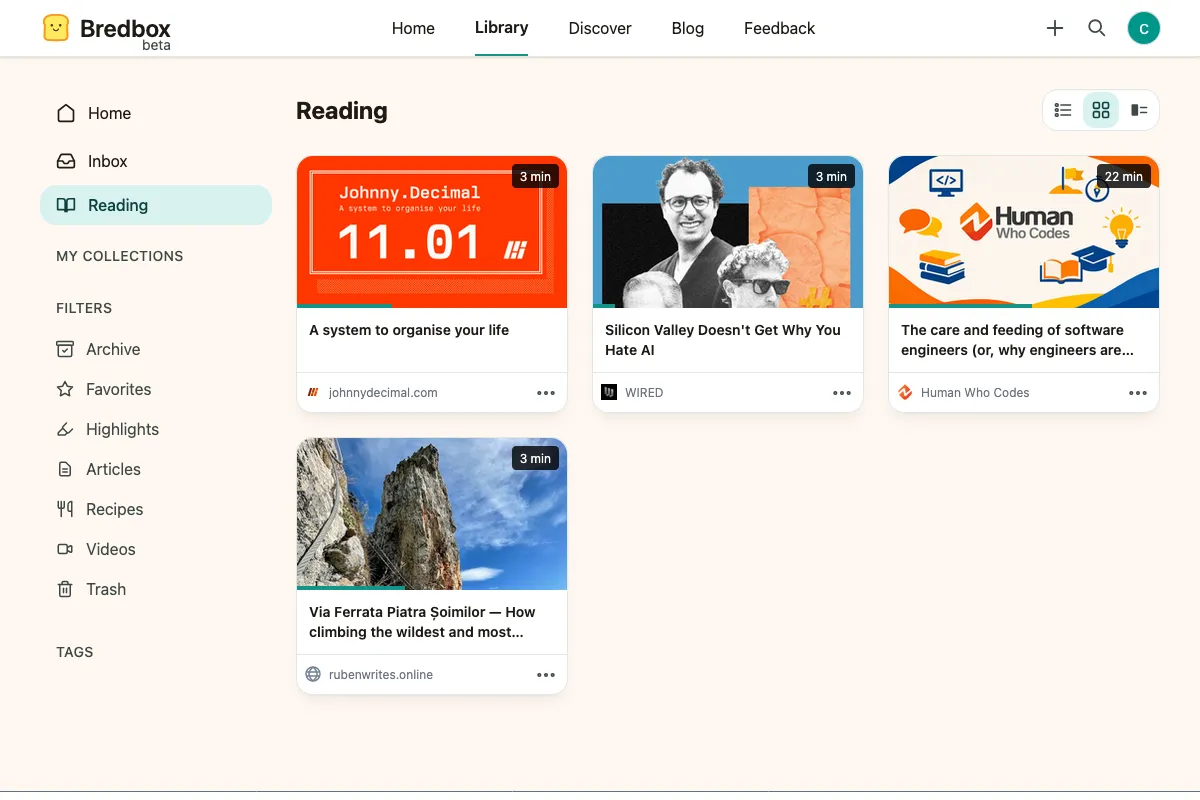
Once you start making progress through an article, it appears in Reading. The articles you’ve interacted with most recently appear first, giving you one place to see what’s currently underway.
There’s no need to maintain a special tag or collection. Just read.
And importantly, Reading isn’t another inbox you’re expected to empty.
An unfinished article can stay there until you feel like returning to it. Bredbox is meant to be a home for your curiosity, not another system measuring whether you’re keeping up.
See your progress at a glance
When you have several articles underway, it helps to know more than just which ones you’ve started.
In Tiles and Details views, Bredbox shows a progress bar directly on the article image. The bar reflects your current reading position, so you can scan several articles at once and quickly see which one you barely started, which one you’re halfway through, and which one you’re close to finishing.
That means you don’t have to open each article just to remember where you left off. Your library gives you a visual sense of your progress before you choose what to continue reading.

Reading and organizing are separate things
Maybe you started a long essay, decided you didn’t want it sitting in your Inbox anymore, and archived it.
It still appears in Reading.
That’s intentional. Archiving answers one question: where do I want this saved? Reading answers another: what am I currently partway through?
An article can therefore live in your Archive while remaining easy to return to from Reading. Filing something away shouldn’t make Bredbox forget that you haven’t finished it yet.
Finished when you say it’s finished
Scroll position can tell software how far down a page you’ve gone. It can’t reliably tell whether you consider an article finished.
So Bredbox leaves that decision to you.
When you reach the end of an article, you can mark it as read or leave it unfinished. You can also mark an article as read at any time from its controls.
Marking something read removes it from Reading, but it doesn’t throw away your position. If you open it again later, Bredbox can still return you to where you were.
And if you decide you want to start over, marking an article unread clears its saved progress so the next reading session begins at the top.

A quieter kind of continuity
The web is very good at giving us more things to look at.
A personal reading library should be good at something different: helping you give your attention to something when you’re ready.
Sometimes that means saving an article today and reading it next month. Sometimes it means reading half of it on your phone and finishing it on your laptop after dinner.
Either way, Bredbox remembers where you were so you don’t have to.
Your library is there when you’re ready to come back.